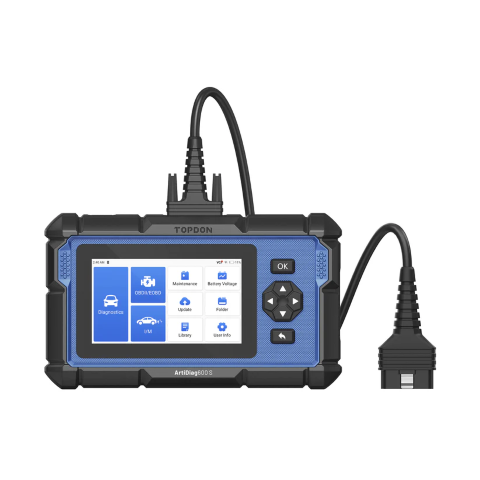
As someone who’s spent years tinkering with cars in my garage, I’ve relied on simple OBDII scanners to pull codes and clear check engine lights. They’ve served me well for basic tasks, but with modern vehicles packing in more electronics and complex systems, I’ve found myself needing something with extra muscle. That’s where the TOPDON AD600S (also known as ArtiDiag600S) comes in. This mid-range diagnostic tool promises deeper diagnostics and specialized resets, making it a potential game-changer for home mechanics dealing with everything from engine issues to brake jobs. TOPDON provided a unit for testing, and after putting it through its paces on a mix of vehicles, here’s my take on whether it’s worth the investment.
What’s in the Box and Key Specs
The AD600S arrives in a compact package with the essentials: the scanner itself, a USB-C charging cable, a protective cover for the OBD-II connector, a quick start guide, and a full user manual. No frills, but everything you need to get started.
Under the hood, it’s built on Android 6.0 with a 1.3 GHz quad-core processor, 1GB RAM, and 16GB storage (expandable via microSD). The 5-inch color touchscreen is bright and responsive, backed by physical navigation buttons for when your hands are greasy. It weighs about 22 ounces and measures roughly 8.7 x 5.2 x 1.5 inches, making it portable yet sturdy with a rugged plastic housing. Power comes from a 1500mAh battery that charges via USB-C or draws from your vehicle’s OBD port during use. Operating voltage is 9-18V, and it supports temperatures from 32°F to 122°F—perfect for garage work in most climates.
One standout feature is built-in Wi-Fi for over-the-air updates, with lifetime free software upgrades from TOPDON. It supports multiple languages, including English, Spanish, and German, adding to its versatility.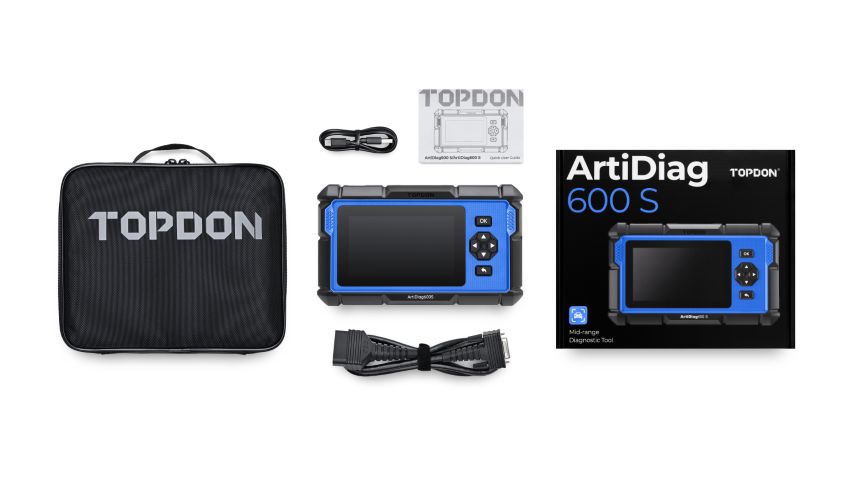
Core Features: Diagnostics and Resets
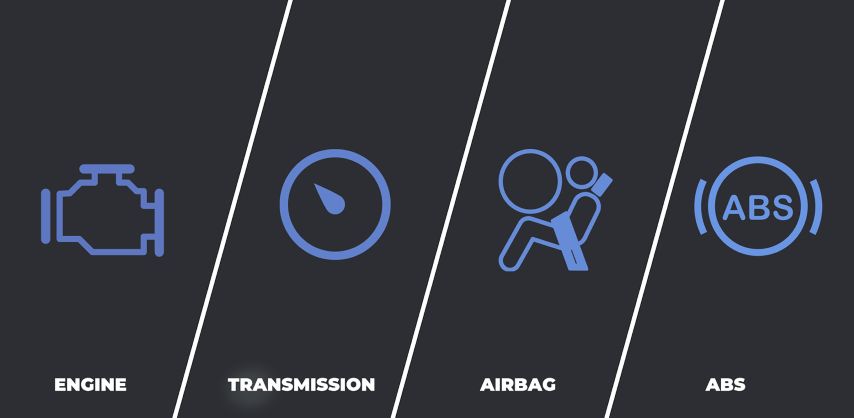
The AD600S shines in its diagnostic capabilities, focusing on four key systems: Engine, Transmission, SRS (Supplemental Restraint System for airbags), and ABS (Anti-lock Braking System). This goes beyond basic OBDII readers by providing in-depth scans for these areas on over 90 vehicle brands from 1996 onward, covering American, European, and Asian models.
It also includes eight maintenance resets:
- Oil Reset: Clears service lights after oil changes.
- BMS Reset: For battery management in hybrids or EVs.
- ABS Bleeding: Helps purge air from brake lines.
- DPF Reset: Regenerates diesel particulate filters.
- Brake Reset: Handles electronic parking brakes (EPB) for pad/rotor jobs.
- TPMS Reset: Resets tire pressure sensors.
- Throttle Adaptation: Relearns throttle positions.
- SAS Reset: Calibrates steering angle sensors.
These features make it ideal for more advanced DIY repairs, like brake work on vehicles with electronic systems or troubleshooting emissions issues.
Setup and Initial Impressions
Getting started is straightforward but requires some patience. Plug the fixed 4-foot OBD-II cable into your vehicle’s port (usually under the dash), turn the ignition to “ON” (without starting the engine), and power up the scanner. It prompts for language and time zone selection, then connects to Wi-Fi for updates—essential for the latest vehicle compatibility. I updated apps for my test vehicles (a 2015 Honda Civic, a 2018 Ford Explorer, and an older 2005 Toyota Camry), skipping irrelevant ones to save time. The process took about 20 minutes, but it’s a one-time hassle.
The interface is intuitive, with a home screen offering options like Diagnosis, OBDII/EOBD, Maintenance, and Updates. You can navigate via touch or buttons, which is handy. The build feels tough, though I noticed minor cosmetic quirks like slight screen edging on my unit—nothing that impacted performance.
Hands-On Testing: Real-World Performance
I tested the AD600S on my Honda Civic first, where a persistent P0420 code (catalytic converter efficiency) had triggered the check engine light. Using AutoSearch, it quickly pulled the VIN and loaded the appropriate modules. The Health Report scanned all systems in minutes, flagging the code without issues. I appreciated the built-in Google search integration—right from the device, it pulled up explanations and fixes via Wi-Fi. Clearing the code was seamless, and the light stayed off after monitoring for a week.
Switching to the Ford Explorer for brake work, I used the Brake Reset to retract the electronic parking brake. It worked flawlessly, allowing me to swap pads and rotors without manual overrides. However, on the Honda, the EPB function threw errors despite troubleshooting—likely a compatibility quirk with that model’s system. This highlights a key point: while the tool supports many vehicles, results can vary based on make, model, and year. Always check TOPDON’s compatibility list.
For the older Toyota Camry, basic OBDII functions like code reading and I/M Readiness (for emissions tests) performed well, though advanced resets weren’t applicable. Data streaming was another highlight: I monitored engine parameters like RPM, coolant temp, and O2 sensor readings in real-time, with options for lists, graphs (up to four parameters), or PDF reports. The graphs update every second or so, which is fine for diagnostics but not as snappy as some Bluetooth apps I’ve used. Recording data saves to internal storage for later review, and you can email reports or share via Bluetooth.
TPMS reset on the Ford was hit-or-miss; it cleared a low-pressure warning on one try but not another, possibly due to the vehicle’s sensors. ABS bleeding and other diesel/hybrid-specific functions weren’t tested, but they seem geared toward pros or specialized needs.
Wi-Fi connectivity was reliable for updates and searches, though it doesn’t auto-connect on boot-up— a minor annoyance fixed by jumping into settings. Screenshots are easy to capture, but accessing them requires digging through folders rather than a dedicated spot.
Pros and Cons
What I Like:
- Comprehensive features for the price—far beyond basic scanners.
- Durable design with a mix of touch and physical controls.
- Free lifetime updates and easy report sharing.
- Real-time data visualization and built-in research tools.
- Works on a wide range of vehicles, even older ones.
What Could Be Better:
- Setup and updates take time initially.
- Some functions may not work on every vehicle due to compatibility.
- Interface can feel cluttered with overlapping options.
- Data stream response could be faster for precise troubleshooting.
- Wi-Fi doesn’t connect automatically.
Final Verdict
The TOPDON AD600S is a capable, feature-rich diagnostic tool that’s perfect for DIY enthusiasts stepping up from basic OBDII readers. At around $270, it’s a solid value for anyone handling routine maintenance or occasional deeper repairs on multiple vehicles. It’s not flawless—compatibility can be spotty, and the learning curve might frustrate beginners—but it delivers on most promises and has become my go-to for quick scans and resets. If your needs align with its four-system diagnostics and eight resets, it’s worth adding to your toolkit. Just verify your vehicles’ compatibility first.
Where to Buy: Available on Amazon(https://www.amazon.com/dp/B09KZTYD18)